


Deposit & Withdrawal on BetFury
Every Betfurian's path begins with a deposit on this crypto gambling platform. The multicurrency on the platform provides players the ability to choose suitable currency and network. That makes playing on BetFury even more convenient. We care about the comfort as well as about the safety of Betfurians' funds during deposits and withdrawals. That's why there are many important points about deposits and withdrawals which every beginner and the experienced user should know.
What Do You Need Before Your First Deposit?
You need three things: a registered BetFury account, crypto in an external wallet (or a card to buy it with), and the correct network selected for your chosen coin. Get the network right and your deposit lands within minutes. Choose the wrong one and recovery becomes slow or impossible. That single choice matters more than any other step on this page. Everything else, from minimums to fees, is secondary to matching the coin with its chain.
Supported Currencies and Networks on BetFury
BetFury runs on a multicurrency system built for flexibility. You can fund in over 40 cryptocurrencies across 18 blockchain networks (ERC-20, BSC, TRC-20, Solana, TON, and others), then withdraw in whichever asset and chain suit you. One standout perk: you can deposit a coin through one network and withdraw it through another when the currency supports several chains. A USDT deposit on TRC-20 does not lock your payout to TRC-20.
Why Does Multicurrency Matter?
Different networks carry very different speeds and fees. A stablecoin transfer on TRC-20 or Polygon costs a fraction of what the same move runs on ERC-20 during busy hours. Picking the cheaper chain leaves more crypto for actual play. Experienced players treat network choice as part of bankroll management, not an afterthought. The same logic applies to speed. Some chains confirm almost instantly, while others need several block confirmations before your balance updates. Knowing the trade-off helps you plan around big sessions and cash-outs.
Crypto Networks You Can Use
The lineup covers the chains most crypto players already hold funds on: ERC-20, BSC (BEP-20), TRC-20, Polygon, Avalanche, Optimism, Arbitrum, TON, and Solana, among the 18 supported networks. Popular assets such as USDT run on several of these at once, so you choose the route that fits your wallet.
How to Make a Deposit?
- Sign In on BetFury and click the “Wallet” button in the top-right corner.
- Click on the “Deposit” section. Pick the currency you want to deposit. Be sure to select a network before depositing. This action should be done to avoid losing money when transferring funds.
- BetFury provides uniquely generated addresses for each currency on a specific network.
- Copy the provided address in the deposit section if you want to deposit funds.
- Then you can transfer money to it from a third-party wallet or scan the QR-code.
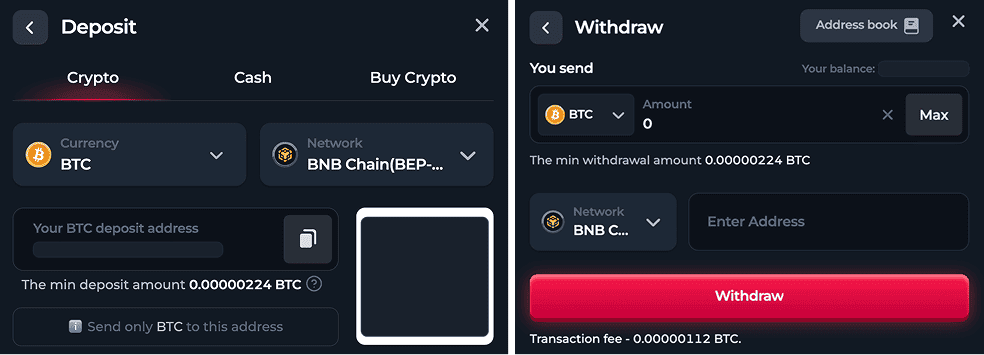
The amount of the minimum deposit for each coin is different. Make sure you have sufficient funds on your balance to cover the commission to costs.
How to Complete a Withdrawal?
You can withdraw any cryptocurrency to an external wallet which supports the network you choose. Pick the digital asset and the network you want to use for making a withdrawal. Then enter the wallet address, the amount of crypto, and click the “Withdraw” button. The min. amount is also different for each coin.
How Long Do Withdrawals Take?
Most payouts are quick. BetFury processes over 95% of withdrawal requests within minutes. Larger wins and flagged transactions take longer. Because security comes first, the risk department runs a manual audit on transactions. Withdrawals can take up to 24 hours for wins in Original games and up to 72 hours for wins in integrated games.
Why Some Withdrawals Show as Pending
A pending status usually points to the network, not a problem with your account. Chains like BTC Native confirm more slowly than TRC-20 or BSC, so the wait is normal. Big wins add a manual verification layer for cybersecurity. Your assets reach the destination wallet once those checks clear, and no action is needed on your end.
How to Check the Transaction History?
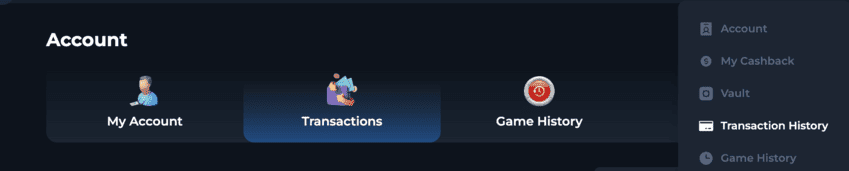
You can track the transactions' status on the platform. Go to Account ➤ Transactions, and find all the operations. Thanks to a convenient filter, you can select the period and the transfer type.
Make withdrawals of your crypto fast and seamless. Add your third-party addresses to the Address book. Switch between them and choose the one that suits you. To use the Address Book, open your Wallet, choose a network, fill in the Wallet Name and Wallet Address. The new address is successfully added to the Address book.
⚠️ Important! Make your account more secure. Enabling two-factor authentication is required for withdrawing funds from BetFury.
New Wallets Added on BetFury
Betfurians, we’ve expanded the list of supported wallets for deposits and withdrawals, so you get more options when moving your crypto in and out of BetFury.
If you already use one of these networks, choose it for your BetFury transactions too.
Your current wallets stay active, keep using the ones you already love or pick the new one.
Added Wallets
1. erc20: 0xf8e9f46c0f067aa04da945f6859f837156e36e00
2. doge: 0xadb19291b24260b164d1cd17588e6159a554121c
3. arbitrum: 0x15a1bf9e562bdb3c22f23223e9bf9692057a1843
4. optimism: 0x0c10e6e444f1326235b48ebbc2e9217c6a55d0e3
5. bsc: 0xa8f5a00aa1908136a92f377810d3316222a85751
6. polygon: 0xd4578ca4a926db9b4eb6b7141a33bcb9e4b5da5d
7. avalanche: 0x7efba8f1c85575b3643ddb82c7cbb2ab004982a3
8. etc: 0x1b042847a6284347cd24e949b0d84ab5b294e2eb
9. trc20: THyeY7kTHV4u68PCCqYbkfKwpie2xYyR2D
10. ton: UQBdwKeVm2YFdAJJ5B3Zb-Vft5FgKuIe9v08sA3wcJ_8aWd1
11. solana: F6XUpd9cUofkMpWLaAKmgGKL67Cyn7xmD6u32MuZK3zt
Safety Tips
Before making a deposit or withdrawal, always double-check the selected network and wallet address. They must match, otherwise your funds may go to the wrong destination.
A few more tips:
- Copy and paste the address instead of typing it, then check the first and last few characters.
- Make sure the network on BetFury matches the one your exchange or wallet uses: for example, USDT on TRC-20 and USDT on ERC-20 are different networks.
- Start with a small test transaction if it’s your first time trying a network.
FAQ About Deposit/Withdrawal
- Is there any commission?
Commission for the deposit depends on the user’s payment system. Withdrawal is conducted with some fees based on the currency and the network. For example, BTC withdrawals require 0.00025 BTC for a Native network and 0.00000112 BTC for a BNB Chain network. - How can I check my previous transactions?
Go to your Account and click on the "Transaction History" button. Find here all info about your deposits, withdrawals and other transactions. - What are min/max withdrawals and deposits?
It depends on the chosen network. For example, the minimum USDT deposit withdrawal amount is 1 USDT and 0.5 USDT for the BNB Chain. - Withdrawal is pending? What's happened?
It’s mostly connected with networks like BTC Native, which are significantly slower. Don't worry, your assets will come on the balance soon. Big wins withdrawal can take a bit more time than usual. It's done to ensure the сybersecurity. Moreover, it requires manual verification.